Why Responsiveness Isn't an Easing Curve
There is sunshine
- “Persimmon,” a song by Sandy Lam
When I read on the subway, I always find myself wanting a cross-platform reader whose page turns follow my finger and feel natural.
Google Play Books has a natural, responsive page-turn animation, but it is unreliable and slow, and the iOS version is stripped down. Apple Books has a page-turn animation that does not quite follow the finger. Both work best only within their own ecosystems.
So I decided to build a reader of my own, one with comfortable, natural page turns.
A simple one. A pure one. Persimmon—the name flashed into my mind, like the sunshine in Sandy Lam's song.
Isn't that exactly what books and knowledge feel like: sunshine?
Persimmon Reader
The app is live now, and completely free.
When I first started working on the page-turn animation, I thought the problem was simple: bend a rectangle around a cylinder, add a pleasant easing curve, and the result would look convincing enough.
Once I actually began building it, I realized that bending the paper was, if anything, one of the simpler parts of the whole system.
I did not want to merely “play a page-turn animation.” I wanted the paper to respond the instant a finger touched it, to let the reader change their mind halfway through a drag, to let each sheet stack naturally during rapid consecutive taps, and to hand control seamlessly to the animation after the finger lifted. At the same time, the page underneath had to contain the real EPUB text, images, fonts, and pagination results.
What I ultimately had to coordinate was no longer a single animation curve, but input, geometry, content preparation, render threads, and resource lifecycles.
Persimmon's continuous page-turning effect
The First Sheet of Paper
I began by experimenting in a standalone WebGPU/WebGL2 prototype.
The first version used the most straightforward cylinder model: the page wrapped around a cylinder as it turned. It did bend, and it ran reliably, but comparing it frame by frame with recordings of real pages being turned made the problem obvious—it looked more like a rigid roller sweeping across the screen than a sheet of paper.
People turn a page in one of two ways: either they hold the sheet and swing it over, or they pin it with a finger and roll it along, moving continuously until the paper curls into a tube, unfurls, and lies flat.
I wanted the latter.
So I switched to a paper profile with continuous curvature. Every frame reconstructs the page from a deterministic set of tangent directions, without introducing mass, gravity, collisions, or long-lived integration state. The paper is inextensible; it simply transitions from being pressed, to curling into a roll, to crossing the spine, and finally to lying flat on the other side.
That gave me my first insight: a natural feel does not necessarily come from a more complex physics simulation. Often, it comes from more accurate constraints.
The Geometry Was Right, but the Feel Was Still Wrong
Even after the sheet looked like paper, the interaction still behaved strangely in many ways.
The page would release automatically near the spine even though the reader's finger was still down. The same drag distance produced a different paper shape depending on where the drag began. A hinge travel distance fixed in pixels felt completely different on a phone and a tablet. A tightly curled sheet sprang back at the same speed as one that had only been lifted into a gentle arch.
I eventually solved these problems not by continuing to tweak the easing, but by redefining the relationship between input and paper:
- As long as the finger remains down, control always belongs to the finger;
- The touch-down point is only the origin of the local coordinate system; relative movement is what actually determines the paper's shape;
- Hinge travel is derived from page geometry instead of being hard-coded as a pixel value;
- On release, distance, velocity, and acceleration are considered together to decide whether to complete the turn or spring back;
- The so-called “paper weight” changes only the commit threshold. It does not secretly alter the geometry during the drag.
I gradually realized that responsiveness begins with predictability. When readers make the same movement, the paper should respond in the same way, with no hidden auto-release, coordinate jump, or state transition in between.
Putting the Prototype into a Real Reader
The standalone prototype only had to handle a single texture. A real reader also has to deal with EPUB parsing, fonts, image decoding, pagination, and chapter transitions.
I used Readest as my primary reading app for a while, but its page-turn animation was based on screenshots captured from the system WebView. No matter how it was optimized, that made it difficult for the page turn to truly follow the finger. I kept the animation disabled at the time, but the problem continued to nag at me.
That is why Persimmon never used a WebView in the first place. Content is compiled into platform-independent data, then laid out and drawn directly by Skia. Early on, I even wrote “pages are not screenshots” into the architectural principles because I did not want the body text to become a bitmap stripped of its sharpness and interactivity.
But when a sheet undergoes a complex deformation, directly bending the entire live-rendered tree of text and images is not practical either.
The solution I eventually found was a hybrid architecture: stationary pages are always drawn live by Skia, while only the sheet currently being turned is temporarily recorded and rasterized. Once the animation ends, the view returns to live pages.
This did not reject the original principle; it defined its boundary more precisely. Screenshots cannot be the reading hot path, but they can serve as short-lived animation textures.
More Lanes Did Not Make the System Truly Faster
Once a single page turn worked, I began testing rapid consecutive taps.
The most intuitive approach was to add more animation lanes so that more sheets could be in flight at once. For a while, I kept adding lanes. The visible queue became shorter, but texture residency, page capture, and memory costs all increased, while the first frame still did not necessarily appear in time.
That was when I realized that concurrency slots solve capacity, not latency.
Even if the scheduler launches one sheet every 100 ms, before the reader actually sees it there may still be a React state update, page recording, rasterization, texture installation, component commit, and the Canvas's first draw. Setting the interval to 100 ms does not mean a valid frame will necessarily appear within 100 ms of the input.
The real turning point was moving real-time animation control down into a persistent native compositor. Adjacent pages enter a budgeted, bidirectional stock in advance. When a page is already warm, the gesture goes directly through the UI/native path. JavaScript handles pagination, replenishes the stock, and reconciles the final position; it no longer drives the animation frame by frame.
The performance gain came from shortening the critical path, not simply reducing the duration.
The Paper Turned Blank
One of the failures that stayed with me most happened during an experiment in texture optimization.
I tried to reuse GPU snapshots directly across Canvases, skipping the CPU readback and re-upload. Type checking passed, the tests passed, and the bundle built successfully, but on a real device the texture on the moving sheet simply disappeared.
The reason was that a GPU-backed snapshot still depended on the Skia context that created it; it was not inherently sampleable across contexts. In the end, I restored a portable raster path: first create the snapshot, then convert it into an image that is not tied to the original texture context.
This made me recognize a limitation of coding agents.
In backend development, it is easier to prove the correctness of a service that cannot be seen. A deep understanding of the business logic is often enough.
The frontend is different.
Passing tests and logs that look correct can prove that the program's logic has not broken, but they cannot prove that the reader actually saw what they were supposed to see.
A rendering system ultimately has to be validated on a physical device.
This pushed me to keep investigating how coding agents might test and validate software on physical devices.
Perhaps the frontend has already died several times, but there are always a few devious problems that only the human eye can catch, delaying its next death.
The Bigger It Gets, the More...
Once the system could run at high speed, I ran into a subtler problem: sustained page turning would trigger memory pressure and even a Hermes OOM.
The culprit was not one particularly large texture, but the accumulation of Paragraphs, Pictures, recording graphs, and old and new generations coexisting during layout changes. More troublesome still, some native objects that were “no longer needed” by the business logic could still be referenced by the next frame's display list.
The solution was not to clear every cache at once, but to establish an explicit retirement policy:
Paragraphs and recordings use budgeted LRUs; the pagination counting stage does not retain layout objects long term; an old generation first stops being used, then waits for enough drawing opportunities before being released; the native page stock assumes explicit ownership of pages that are still being animated; idle lanes and display links must actually sleep.
Producing one beautiful page-turn animation is not difficult. Making the previous sheet, the next sheet, and the sheet from a hundred pages ago all disappear at the right time is where a truly stable system begins.
The First Time I Turned “It Feels Fast” into Numbers
While writing this, I recorded a 76-second Instruments Game Memory trace from a Release build on an iPhone 17 Pro Max. The period in which Metal frames were continuously committed was about 33 seconds. I then left the app untouched for about another 30 seconds to see whether the page stock and temporary textures would return to a stable plateau.
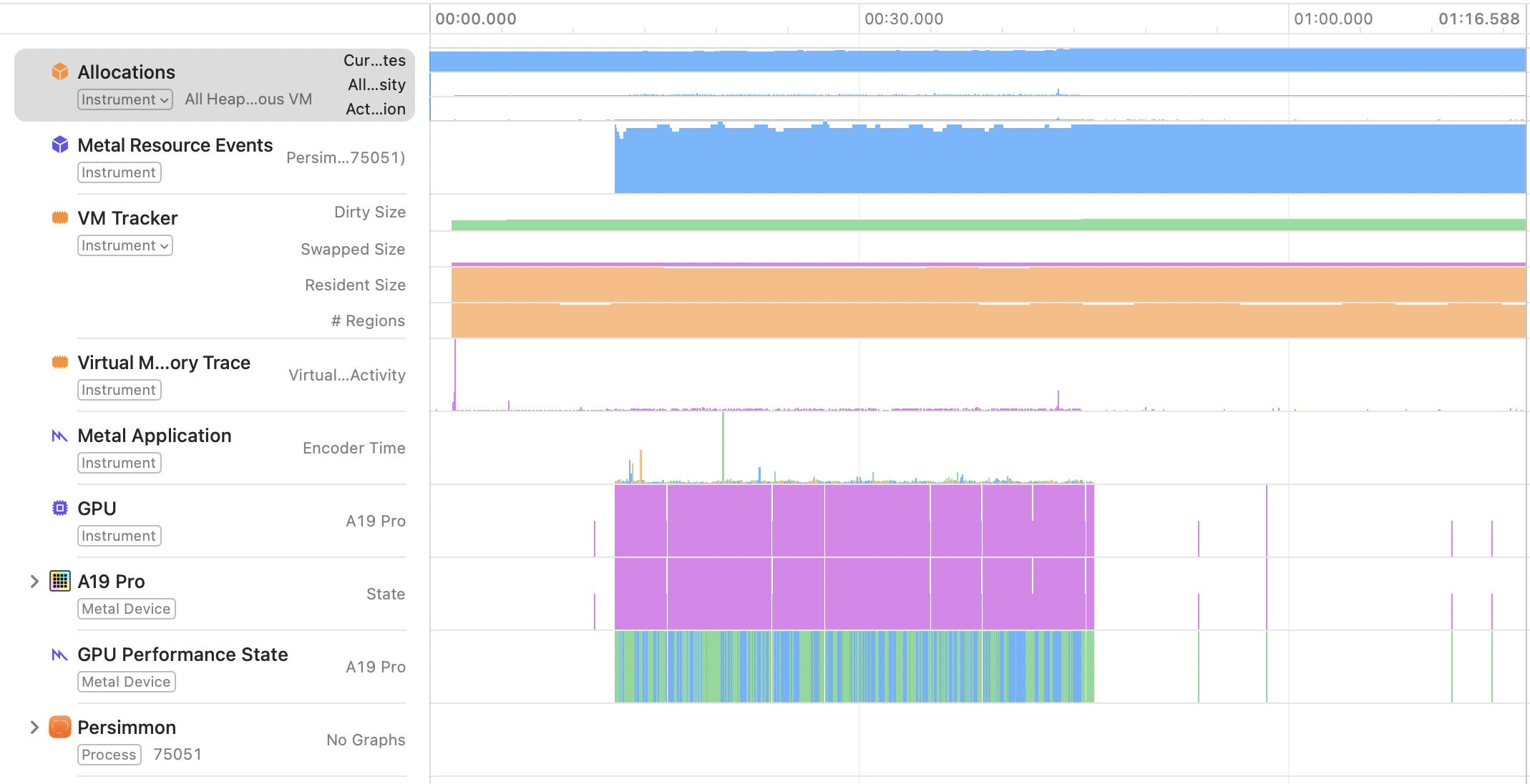
Figure: Blue represents Metal resource events, and purple represents GPU activity. After page turning stops, the GPU exits sustained activity, and the VM curves do not continue climbing.
In this trace, the first sample of MTLDevice.currentAllocatedSize was 296.14 MiB, the peak was 311.16 MiB, and the final value after the idle period was 296.11 MiB. In other words, Metal's peak during the test was about 15.02 MiB above the stable plateau—close to the size of one 1320 × 2868 RGBA8 full-screen texture. That increase was no longer retained after the test ended.
To keep answering the question “How fast is it, exactly?”, I recorded another Game Performance trace that preserved the full 40.92-second timeline. Continuous compositor activity ran from 7.29 to 33.09 seconds: 25.79 seconds in total, with 2,976 actual on-screen presentations. The P50 interval between adjacent presentations was 8.334 ms, P95 was 8.334 ms, P99 was 16.668 ms, and the maximum was 25.002 ms. The median cadence was about 119.99 Hz, and the average presentation rate across the full interval was 115.34 fps.
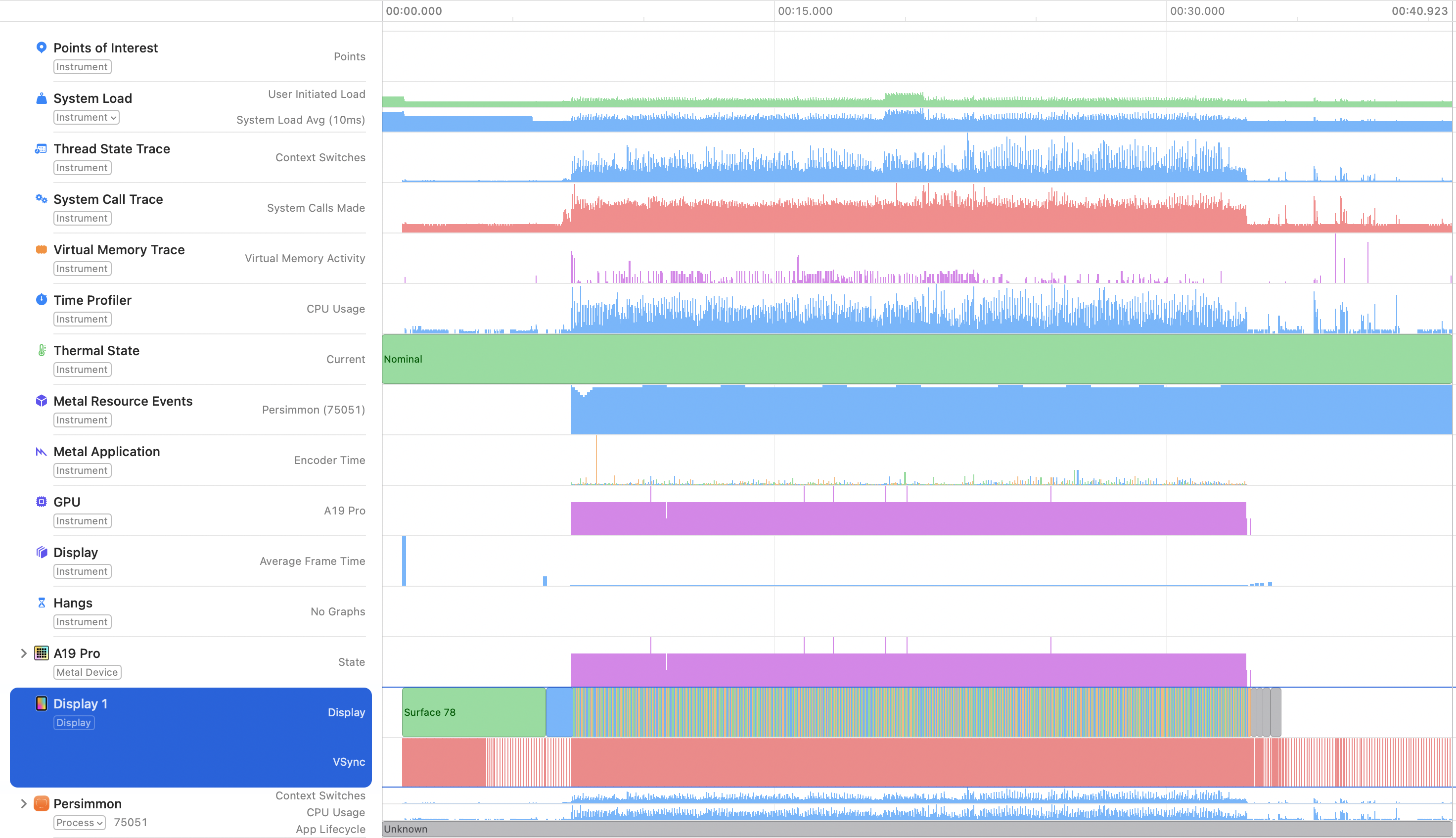
Figure: The green region shows that the thermal state remained Nominal throughout; purple represents GPU activity; the enlarged Display 1 track shows the continuously cycling three-buffer surface set and the actual VSync events.
The important point here is not to count every interval above 8.33 ms as a dropped frame, but to reconcile the presentations one by one with the VSync events that the display actually produced at the time. There were 3,034 actual refresh opportunities in this interval. Of those, 59 received no new Persimmon surface, for a miss ratio of 1.94%; the maximum number of consecutive misses was only 1. Among the 112 presentation intervals of about 16.67 ms, 57 occurred simply because the system itself had temporarily switched to about 60 Hz, not because the app had missed a frame.
The same trace also captured Persimmon's own Metal data. Using 2,974 logical frames as the sample and merging all intervals of app GPU activity within each frame, GPU work had a P50 of 4.96 ms, P95 of 8.41 ms, and P99 of 9.74 ms. Metal encoder time had a P50 of 0.18 ms, P95 of 0.88 ms, and P99 of 1.98 ms. The GPU P95 is slightly above the single-frame budget at 120 Hz, which corroborates the small number of VSync misses: the system is fast, but there is still room to optimize the tail.
Reverse Page Turns Are Not Simple Mirrors Either
Later, while handling rapid reversals, I fell into another trap that had seemed self-evident.
In a forward turn, the current page is lifted away to reveal the target page underneath. In a reverse turn, however, the target page comes back over from the left, while the current page should remain underneath. The page ownership, background, and drawing order of the two are not simple left-right mirrors.
Many flashes that looked like “the animation speed is wrong” turned out to be a wrongly chosen background page, an unretired visual tail from the old direction, or a page stock that had been consumed too early. Shortening the duration further only concealed the problem; it could not fix the underlying semantics.
What I Finally Understood About Responsiveness
Looking back now, Persimmon's page-turning experience did not come from any single magical formula. It came from several things being true at the same time:
- A stable, predictable geometric relationship exists between the finger and the paper;
- Before the reader begins an action, the correct page content is already prepared;
- Once the animation begins, it remains continuously owned by a renderer that no longer depends on React for frame-by-frame scheduling;
- Once the animation ends, textures, paragraphs, and old generations can retire at a safe moment.
The current real-device tests cover rapid consecutive taps, drag-and-spring-back interactions, and sustained page turning, and I have saved both Game Memory and Game Performance baselines.
At least for this test trace from 2026-08-13, I can say something specific: the continuous drawing interval had an average presentation rate of 115.34 fps, 98.06% of actual VSync events received a new surface, and the app never missed two consecutive refresh opportunities.
But this is still not a claim of “stable 120 fps.” Nor does it measure input-to-first-frame P95 latency. Until native input, presentation, and turn completion are connected to the same signpost timeline, I would rather preserve that boundary.
At least I no longer think of page turning as an easing curve.
It is more like a tiny renderer: prepare the right sheet in advance, hand it over the instant the finger touches down, then take it away once no one needs it anymore.